
In order to use the Screen Sharing feature you must download additional software.
1. Click on the following link to download the software: Screen Share for Mac
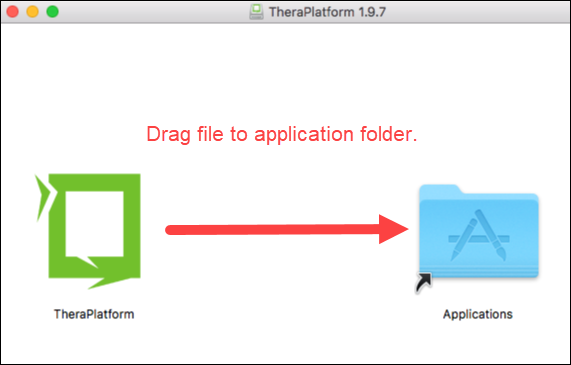
2. Double click on the downloaded file to open it.

3. Drag the TheraPlatform file to your applications folder.
4. If you are using Mojave OS, please follow these extra steps here: Mojave OS Screen Share
5. If you are using Catalina OS, please follow these extra steps here: Catalina OS Screen Share
Note: If you are upgrading to a new version make sure you select to "Replace" the file. If TheraPlatform is running make sure you quit the program by clicking on the TheraPlatform icon in the top taskbar and clicking "Quit" button.
Comments
0 comments
Article is closed for comments.