
Your clients (patients) can join your online meetings via either an email reminder or directly via the client portal. The client portal offers both Join Instant and a Join Scheduled session options. The Join Instant session option does not require scheduling and allows clients to join you online without scheduling a session. We do, however, recommend using Join Scheduled sessions as this option is linked to billing and allows you to schedule sessions with your clients.
If you wish to schedule sessions or if you have a group practice, we recommend the admin disable the Join Instant option.
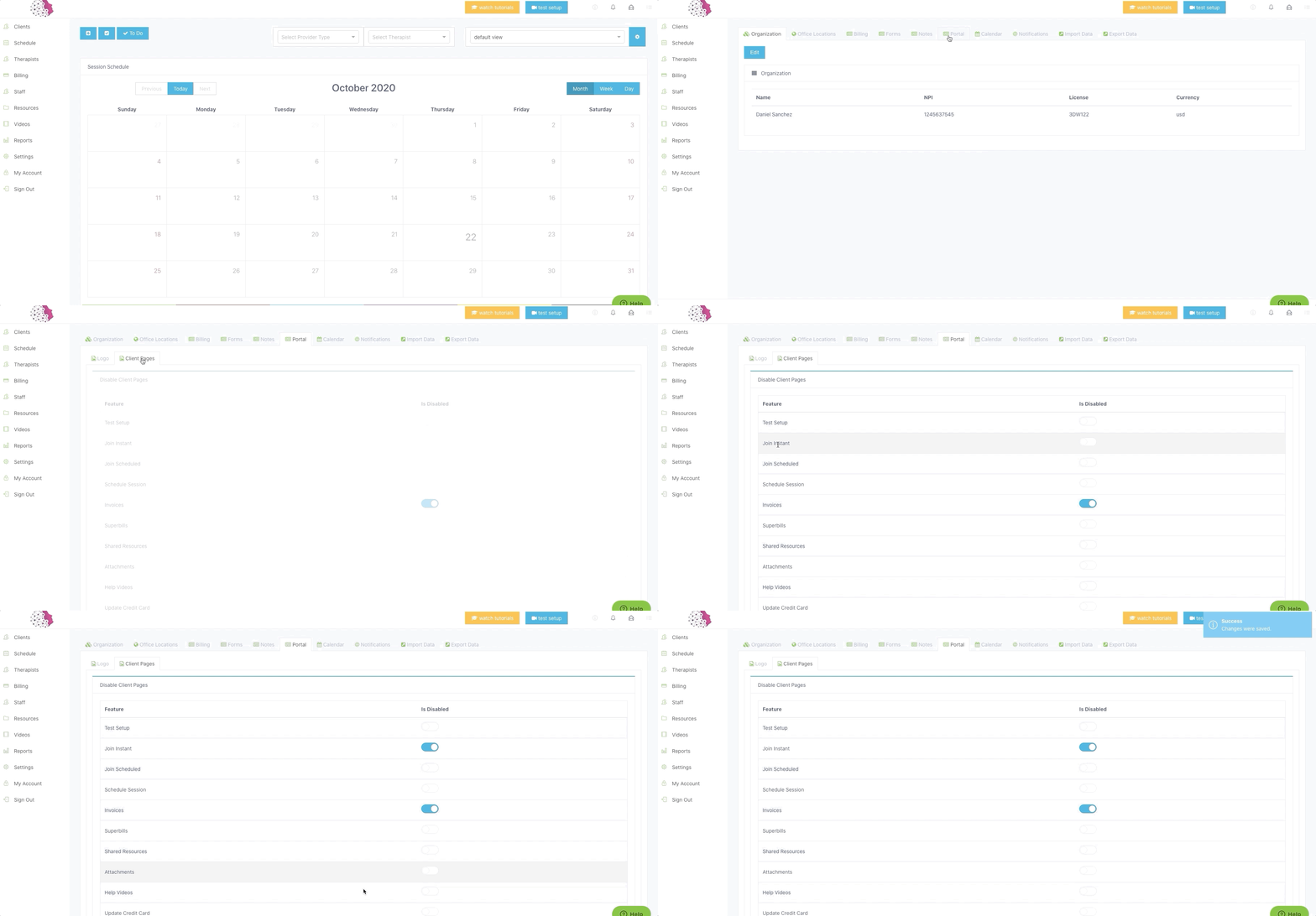
How to disable Join Instant Session
Step 1: Login and click on Settings.
Step 2: Next click on the Portal tab.
Step 3: Then click on the Client Pages tab.
Step 4: A list of functions available to your clients via the client portal will show.
Step 5: Toggle on Join Instant (it should turn blue) to disable this option.
Step 6: Click on Save Changes.
You can modify the functionality available to the client by editing the Client Portal. Please refer to this article on how to change Client Portal settings.
Comments
0 comments
Article is closed for comments.